
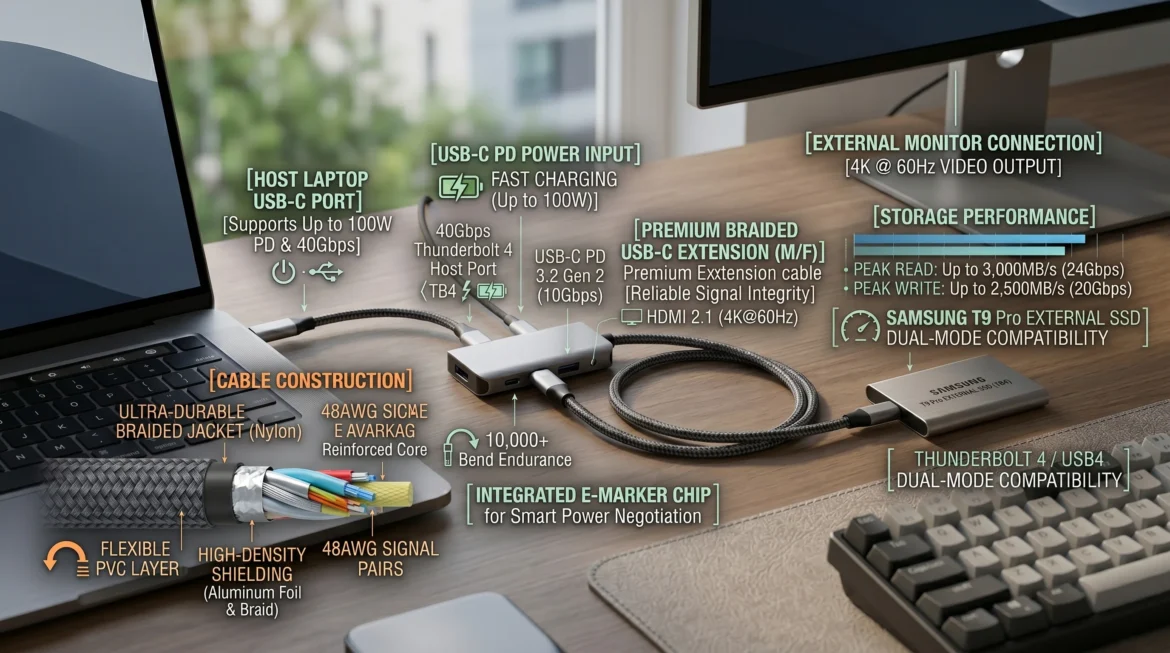
A usb c extension cable has become an essential accessory as modern devices continue to shift toward USB-C connectivity. Laptops, smartphones, monitors, and docking stations now rely heavily on USB-C ports, but one common issue users face is limited cable length. This creates problems in desk setups, gaming stations, and office environments where flexibility is required.
A usb c extension cable solves this issue by extending the reach of your existing connection without replacing the original cable. However, many users do not realize that not all extension cables perform the same. Differences in data transfer speed, charging capacity, and video support can significantly impact performance.
In this guide, we will break down everything you need to know, including USB-C extension limitations, compatibility, safety, and buying factors, so you can make a confident decision.
What is a USB-C Extension Cable?
A usb c extension cable is a male-to-female connector cable that extends the length of an existing USB-C connection. Instead of directly plugging a device into a port, it acts as a bridge between the device and the cable.
Unlike standard USB-C cables, a usb c extension cable is designed specifically for flexibility in distance rather than a direct high-performance connection in all cases. This is why understanding its technical limitations is important before use.
Many users confuse it with a regular USB-C cable or USB-C hub, but each serves a different purpose. A usb c extension cable is simply meant to increase reach, not expand functionality.
How USB-C Extension Cables Work (Technical Breakdown)
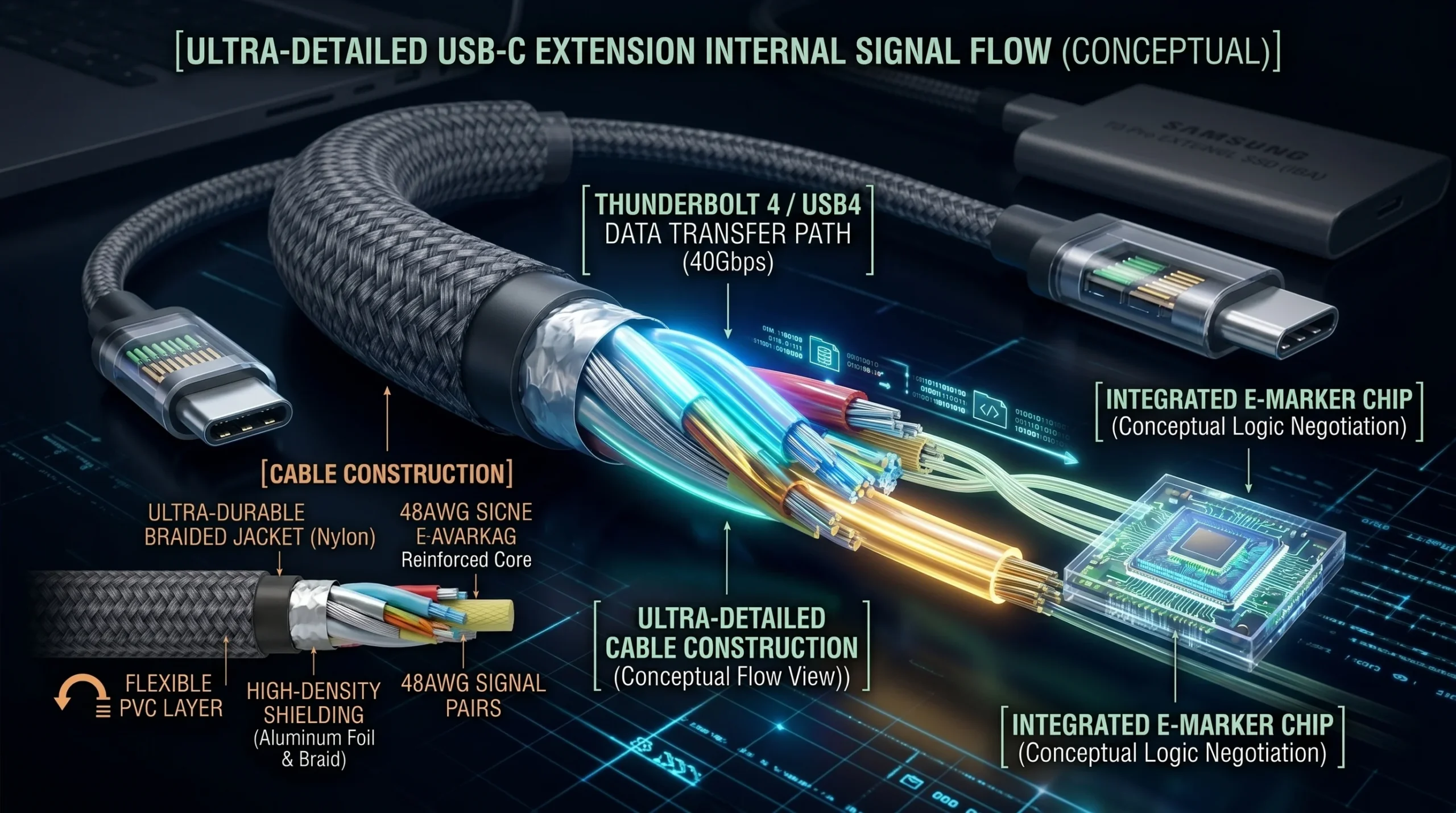
A usb c extension cable works by maintaining electrical continuity between the connected devices while extending the physical distance. It carries power, data, and sometimes video signals depending on the cable specification.
Inside the cable, multiple data lanes handle transmission. These lanes determine how fast data can travel. USB data transfer speed can vary from USB 2.0 levels up to USB 3.2 or even USB4, depending on build quality.
Power delivery is another important factor. USB Power Delivery allows fast charging up to 60W, 100W, or even 240W in advanced setups. However, voltage drop inlow-qualityy cables can reduce charging efficiency.
Another critical component is the E-marker chip. This chip helps devices communicate safely and manage power negotiation, especially in fast charging and Thunderbolt environments.
USB-C vs Extension Cable vs USB Hub
Many users confuse these three, but they are very different in function.
A standard USB-C cable is used for direct connection between devices for charging and data transfer. A usb c extension cable simply increases distance without adding extra functionality.
A USB-C hub, on the other hand, expands a single port into multiple ports such as HDMI, USB-A, and SD card slots. If your goal is only distance extension, a usb c extension cable is the correct choice.
Understanding this difference is important because using the wrong accessory can result in USB-C compatibility issues or reduced performance.
Key Features You Must Understand Before Buying
When selecting a usb c extension cable, several performance factors must be considered.
Data transfer speed is one of the most important. While some cables support only basic USB 2.0 speed, others support high-speed data transfer up to 10Gbps or more.
Charging capability is equally important. A fast charging USB-C cable should support at least 60W power delivery, while laptops may require 100W or higher.
Video output is another feature often overlooked. Not all cables support USB-C DisplayPort Alt Mode or 4K monitor output. This can lead to USB-C video output support issues when connecting external displays.
Thunderbolt compatibility is also crucial for advanced users who need high-performance data and display transmission.
Does USB-C Extension Cable Reduce Speed?
Yes, in some cases a usb c extension cable can reduce performance. This depends on whether the cable is passive or active.
Passive cables may experience signal loss in USB cable connections when used over longer distances. This can result in slower data transfer or reduced charging efficiency.
Active cables include built-in signal boosters that help maintain performance over longer distances.
Cheap or uncertified cables are more likely to cause USB bandwidth limitation issues, especially during high-speed data transfers or gaming setups.
USB-C Extension Cable Safety Explained
Safety is a major concern for users when using a usb c extension. While most certified cables are safe, low-quality cables can create risks such as overheating, USB-C cable issues, or unstable power delivery.
A major concern is whether a USB-C extension cable can damage a device. In most cases, certified cables are safe, but non-certified products may cause voltage instability.
It is always recommended to use USB-IF certified cables to ensure proper device protection and stable performance.
Maximum Length and Signal Loss Explained
USB-C technology has strict limitations when it comes to cable length. A usb c extension that is too long may suffer from signal degradation and USB-C issues.
As length increases, data signals become weaker. This affects both speed and stability.
Active cables are designed to solve this problem by boosting signals, making them suitable for longer desk setups or professional environments.
For high-performance use cases such as gaming or video editing, keeping cable length minimal is recommended.
Compatibility Guide
A usb c extension cable may not work equally across all devices. Compatibility depends on both hardware and protocol support.
MacBook devices generally support USB-C extension cables for charging and data, but full video output may depend on Thunderbolt support.
Windows laptops vary depending on manufacturer specifications. Some support full USB-C functionality while others are limited.
Android devices usually support charging and basic data transfer but may not support advanced video output.
Many USB-C compatibility issues arise when users assume all USB-C ports offer the same functionality, which is not true.
Best Use Cases for USB-C Extension Cables
A usb c extension cable is ideal for multiple real-world scenarios.
In gaming setups, it allows better positioning of devices for improved cable management.
In office environments, it helps create cleaner desk setups and reduces clutter.
For monitor connectivity, it provides flexibility when connecting external displays.
It is also commonly used in docking station setups where devices need extended reach for better workspace organization.
Common Problems and Fixes
Users often experience issues such as device not detected, slow charging after extension, or no video output.
These problems are usually caused by low-quality cables or unsupported specifications.
Ensuring proper USB-C compatibility, checking power delivery ratings, and using certified cables can resolve most issues.

USB-C Extension Cable Buying Guide
When purchasing a usb c extension, always check the following:
Data speed rating such as USB 3.2 or higher
Power delivery support for fast charging USB-C cable requirements
Video output compatibility for 4K monitor USB-C cable use
Certification standards to ensure safety and performance
Choosing the right cable ensures long-term reliability and avoids performance issues.
Future of USB Technology
USB technology is evolving rapidly with USB4 and Thunderbolt 4 leading the future of connectivity. These standards offer higher speeds, better power delivery, and improved device compatibility.
In the future, usb c extension designs will likely become more advanced with better signal protection and higher bandwidth support.
FAQ Section
Are USB-C extension cables safe?
Yes, if they are certified and properly built, they are safe for most devices.
Do USB-C extension cables reduce speed?
They can reduce speed if they are low quality or exceed optimal length.
Can USB-C extension cables support fast charging?
Yes, if they support USB Power Delivery standards.
Do they work with Thunderbolt devices?
Only if the cable is Thunderbolt compatible.
Conclusion
A usb c extension cable is a practical solution for extending connectivity in modern setups. However, performance depends heavily on cable quality, compatibility, and specifications. By understanding speed, charging, and safety factors, you can choose the right cable that fits your needs and avoids common issues.